From the Blog
Tips, insights, and best practices for voice dictation and productivity
How to Turn Voice Notes Into Professional Writing (2026) -- A Complete Workflow
Voice notes are fast to record but slow to turn into usable writing. This guide covers the complete workflow for converting voice notes into professional emails, reports, and documents in 2026.

The Best Voice Typing App for Windows 11: What Actually Works in 2026
Win+H is already on your machine, but it's not the only option on Windows 11. A practitioner's comparison of built-in dictation, Voice Access, and the paid apps worth knowing about.
Apple Dictation vs Oravo: Which Voice Typing Should You Use on Your Mac?
Your Mac already has free dictation built in. Here's exactly what it's good at, where it starts to annoy you, and the signs you've outgrown it.

Best SuperWhisper Alternatives in 2026 (and When to Stay)
SuperWhisper is excellent, but not everyone wants subscriptions, Mac-only tools, or English-only translation. Here is an honest look at the alternatives, who each one suits, and how to switch without losing your setup.
Wispr Flow vs Oravo: An Honest Comparison (2026)
Both apps let you hold a key, talk like a person, and get clean text in any app. They differ on price, languages, privacy, and the extras. Here is who should pick which.

Voice Typing for LinkedIn Posts: How to Dictate Posts, Comments, and Messages
Your LinkedIn posts sound stiff because you're typing them. Here's how to dictate posts, comments, and DMs on Mac, Windows, and phone.
How to Use Voice Typing in Figma: Dictate Comments, UX Copy, and Handoff Notes
Figma has no built-in voice input, but your computer's voice typing works anywhere your cursor is: comments, text layers, sticky notes. A practical guide to dictating design feedback, microcopy, and handoff notes by voice, including the traps that catch first-timers.
How to Voice Type in WhatsApp Web: Dictate Messages From Your Laptop
A practical guide to dictating WhatsApp messages from your laptop browser: Windows and Mac built-ins, Chrome extensions, multilingual chats, and what to do when the mic won't cooperate.
Voice Dictation for Journaling (2026): How to Turn Your Thoughts Into Written Entries
Voice dictation removes the friction from journaling that makes most people quit. This guide covers how to use voice dictation to build a consistent journaling habit in 2026.
Voice Typing in Jira and Linear: A Field Guide to Faster, Better Tickets
Tickets die from vagueness, not typos. A practical guide to dictating Jira and Linear issues, acceptance criteria, and sprint updates by voice, including the editor quirks that trip people up.
How to Use Voice Dictation to Brainstorm Ideas Faster (2026)
Voice dictation is the fastest way to get ideas out of your head and onto the page. This guide covers exactly how to use voice dictation for brainstorming in 2026

Voice Typing in Obsidian: 3 Ways to Dictate Into Your Vault (2026)
Dictate directly into Obsidian notes on Mac, Windows, and iOS. Three approaches, exact setup steps, Obsidian-specific gotchas, and an honest recommendation.
How to Use Voice Typing for Research: From Ideas to a Finished Paper (2026)
Voice typing can dramatically speed up the research writing process -- from capturing ideas to producing a finished paper.

Voice Typing in Word: The Complete 2026 Guide (Built-In Dictate, Commands & Better Options)
Word's built-in Dictate button gets you started, but it's Word-only and has real limits. Here's the exact setup, the full command list, and workflows that make dictation actually useful.
How to Use Voice Typing for Research (2026) -- From Ideas to a Finished Paper
Voice typing can dramatically speed up the research writing process -- from capturing ideas to producing a finished paper.

Voice Typing in Google Docs: The Built-In Method and a Better One
Google Docs has free built-in voice typing, but it only works in Chrome on desktop, times out when you pause, and can't learn your vocabulary. Here's exactly how to use it — and the setup heavy Docs users actually switch to.

Voice Typing in Gmail: How to Dictate Emails on Desktop and Mobile
Dictate full emails in Gmail with exact workflows for built-in tools, Chrome extensions, and a system-wide setup that keeps a formal tone — plus what Google's new Gmail Live voice feature actually does (and doesn't).

Voice Typing in VS Code: Dictate Comments, Commits, and Copilot Prompts
A practical 2026 guide to voice typing in VS Code — what the built-in options actually cover, where they fall short, and how developers dictate comments, commits, and AI prompts without leaving the editor.
Voice Typing in Notion: A Practical Setup Guide That Actually Works
Notion has no built-in voice input. Here's how to dictate directly into Notion pages and databases — with concrete workflows, formatting tricks, and an honest look at what voice typing can and can't do in a block editor.

The Private Voice Dictation App: Zero Data Retention, HIPAA-Ready (2026)
Most dictation apps send your voice to the cloud — and keep it. Here's how to evaluate what "private" actually means before you dictate anything sensitive, and what zero data retention changes.
Voice Typing in Slack: Dictate Messages 4x Faster (2026 Guide)
Slack is where the typing tax hits hardest. Here's how to dictate messages, standup updates, and thread replies by voice in Slack — with exact setup steps, formatting cues, and real workflows.
Best Wispr Flow Alternative in 2026: Same Workflow, About a Third Less
If you like Wispr Flow's hold-a-hotkey-and-talk workflow but not the $15/month price or the cloud privacy trade-offs, Oravo offers the same core dictation experience for about a third less — with zero data retention and a mic that only listens while you hold the key.
Best AI Chrome Extensions for Professionals in 2026 -- Tested for Real Workflow Use
The best AI Chrome extensions for professionals in 2026 go beyond novelty.
Telegram Voice Message Transcription (2026): What Premium Does and What It Misses
Telegram Premium includes voice message transcription, but it only works on received messages and produces raw text with no professional refinement.
Best Productivity Chrome Extensions in 2026: The Short List That Actually Moves the Needle
Most productivity Chrome extension lists are too long to be useful. This one covers only the extensions that deliver measurable daily time savings for professionals.
Best Dragon NaturallySpeaking Alternatives in 2026
Dragon NaturallySpeaking costs hundreds of dollars, runs only on Windows, and still struggles with non-native accents.
Home Remedies for Carpal Tunnel (2026): What Actually Works and How to Type Less
Carpal tunnel syndrome affects millions of desk professionals. We cover the home remedies that actually reduce symptoms, the ones that do not, and -- critically.
Best Voice to Email Software in 2026 -- Tested for Speed, Accuracy, and Professional Output
Voice to email software lets you compose and send emails by speaking instead of typing. We tested every real option in 2026
How to Send Emails Faster Without Sacrificing Quality (2026)
Spending too much time writing emails? We tested every method professionals use to send emails faster in 2026.
Voice Typing vs Typing: Which Is Actually Faster for Professionals in 2026?
Voice typing is supposed to be 3x faster than typing. For most professionals -- especially non-native English speakers -- it is not.
Linux Speech to Text Software (2026) -- Every Real Option Tested and Ranked
Linux speech to text software in 2026 ranges from offline open-source tools to cloud-based professional dictation layers.
Best Wispr Flow Alternative for Android (2026) -- Tested for Accent Support and Professional Output
Wispr Flow does not have an Android app. If you are an Android user looking for a Wispr Flow alternative with AI-powered dictation
Indian Accent Speech Recognition (2026)
Most speech recognition tools were not built for Indian accents. We explain why accuracy drops, which tools handle Indian English best in 2026
Best Voice Dictation App for Android (2026)
Looking for the best voice dictation app for Android in 2026? We tested Oravo, Gboard, Samsung Voice Input, Speechnotes, and more for accent accuracy, professional output quality, and real daily use.
Best Voice Dictation App for Linux: What Actually Works in 2026
Linux users have been underserved by voice dictation tools for years. We tested every real option available in 2026
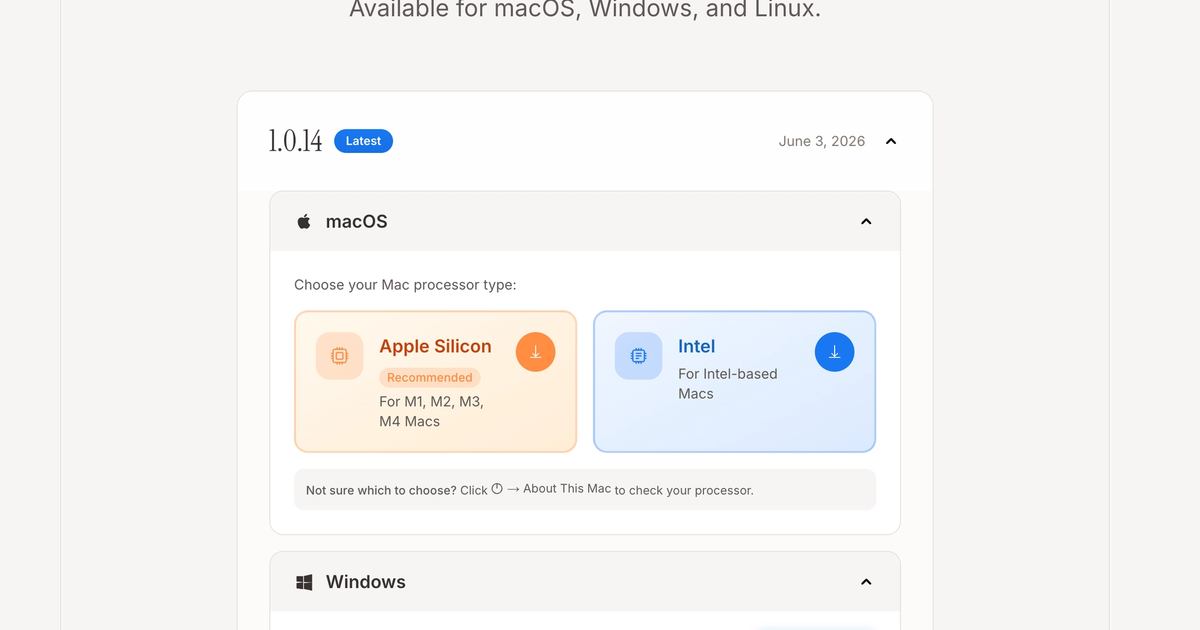
How to troubleshoot an oravo app?
Starting Your First Dictation on Android
How to Dictate Google Docs 4x Faster Without Google Voice Typing
Google Voice Typing slows you down the moment you make a mistake. Learn how multilingual and non-native professionals are dictating Google Docs 4x faster.
Best Voice Typing App for Multi-Language Professionals (2026)
Struggling to write fast in English when you think in another language? We reviewed the best voice typing apps for multilingual professionals.
Best Voice Dictation Software for Email and Messaging Apps | Oravo Ai
Looking for the best voice dictation software for email and messaging apps? We tested Oravo, Willow, Voice In, Voicy, and Voice Dictation for accent accuracy, professional tone, and real workflow fit.
Type 4x Faster in English With Your Hindi Accent
Most voice typing tools fail Hindi speakers. Oravo is built for Indian professionals who work in English daily. Get 3-4x faster with accent-aware dictation that actually understands you.
Voice Typing for Pharmacists: Document Patient Care 4x Faster | Oravo
Pharmacists use voice typing to write clinical notes, MTM documentation, and counseling records 4x faster. HIPAA offline mode. 98% accuracy. Try free today.
Voice Typing for Social Workers: Write Case Notes 4x Faster | Oravo
Social workers use voice typing to write case notes, court reports, and service plans 4x faster. Offline mode for client confidentiality. Eliminate pajama time. Try free.
Voice Typing for Researchers: Publish More, Write Faster | Oravo
Academic researchers use voice typing to write papers, grants, and literature reviews 4x faster. 98% accuracy, offline mode for unpublished research. Try free today.
Voice Typing for Physical Therapists: Write Notes 4x Faster | Oravo
Physical therapists use voice typing to write clinical notes, progress reports, and insurance docs 4x faster. Eliminate end-of-day documentation. Try free today.
Voice Typing for Veterinarians: Write Records 4x Faster | Oravo
Veterinarians use voice typing to write medical records, treatment plans, and client communications 4x faster. Eliminate end-of-day documentation. Try free today.
Voice Typing for Dentists: Write Clinical Notes 4x Faster | Oravo
Dentists use voice typing to write clinical notes, treatment plans, and insurance docs 4x faster. Eliminate end-of-day documentation. HIPAA offline mode. Try free.
Voice Typing for Nonprofits: Advance Your Mission 4x Faster | Oravo
Nonprofit professionals use voice typing to write grants, donor communications, and program reports 4x faster. More mission time, less admin. Try free today.
Voice Typing for Insurance Agents: Close More Policies | Oravo
Insurance agents use voice typing to write proposals, coverage summaries, and client notes 4x faster. More selling time, less admin. 98% accuracy. Try free.
Voice Typing for Architects: Design More, Document Less | Oravo
Architects use voice typing to write specs, site reports, and client communications 4x faster. Document on site visits from your phone. 98% accuracy. Try free.
Voice Typing for Event Planners: Plan Events 4x Faster | Oravo
Event planners use voice typing to write proposals, vendor briefings, and event reports 4x faster. Coordinate from anywhere on your phone. 98% accuracy. Try free.
Voice Typing for Small Business Owners: 4x Faster | Oravo
Small business owners use voice typing to write proposals, emails, and content 4x faster. Run your business from your phone. 98% accuracy. Try free today.
Voice Typing for Marketers: Create Content 4x Faster | Oravo
Marketing professionals use voice typing to write campaign briefs, content, ad copy, and reports 4x faster. 98% accuracy, works across all marketing tools. Try free.
Voice Typing for Therapists: Write Notes 4x Faster | Oravo
Therapists use voice typing to write session notes, treatment plans, and clinical docs 4x faster. 98% accuracy, offline HIPAA mode. Eliminate pajama time. Try free.
Voice Typing for Financial Advisors: Work 4x Faster | Oravo
Financial advisors use voice typing to write client notes, financial plans, and compliance docs 4x faster. 98% accuracy, offline mode for client data. Try free.
Voice Typing for Journalists: File Copy 4x Faster | Oravo
Journalists use voice typing to write breaking news, dictate field notes, and file stories 4x faster. 98% accuracy, offline mode for source protection. Try free.
Voice Typing for Developers: Write Docs 4x Faster | Oravo
Engineers use voice typing to write technical documentation, code comments, and commit messages 4x faster. 98% accuracy, offline mode for secure codebases. Try free.
Voice Typing for Teachers: Grading & Feedback 4x Faster | Oravo
Reclaim 10-15 hours weekly with voice typing for teachers. Complete grading 4x faster, provide better student feedback, protect evenings. Student privacy mode. Try free.
Voice Typing for Project Managers: Standup Notes & Updates 4x Faster
PM productivity: Document meetings 4x faster, manage 50% more projects, coordinate teams effortlessly. Works in Jira, Asana, Slack. Free trial for project managers.
Voice Typing for Accountants: Tax Season Documentation 4x Faster
CPA productivity: Complete tax return letters 4x faster, increase billable hours 25-45%, survive tax season sustainably. Offline mode for confidential returns. Try free.
Voice Typing for Remote Workers: Work From Anywhere 4x Faster
Remote work productivity: Complete async communication 4x faster, work offline without WiFi, maintain productivity across locations. Perfect for digital nomads. Free trial.
Voice Typing for Consultants: Client Deliverables 4x Faster | Oravo
Increase billable hours 20-40% with voice typing for consultants. Complete client reports 4x faster, respond to proposals in days. Offline mode for confidential work. Try free.
Voice Typing for Real Estate Agents: Listings, Offers & Client Communication 4x Faster
Real estate agents: Create property listings in 10 minutes, respond to buyers instantly, close 30-50% more deals. Mobile voice typing for field productivity. Free trial available.
Voice Typing for Executives: Reclaim 15 Hours Weekly for Strategy | Oravo
Executive productivity tool: Complete board reports 4x faster, respond to stakeholders in minutes. Reclaim 10-15 hours weekly for strategic leadership. Confidential offline mode. Try free.
Voice Typing for Customer Support: 4x Faster Ticket Resolution
Resolve 40-60% more support tickets daily with voice typing. Reduce response time 50-70%, improve CSAT 15-25%. Works in Zendesk, Freshdesk.
Voice Typing for Sales Professionals: Emails, CRM & Proposals Faster
Increase quota attainment 20-35% with voice typing for sales. Send 100+ personalized emails daily, complete CRM in seconds. Works in Salesforce, HubSpot. Free trial available.
Voice Typing for Writers: Overcome Writer's Block & Write 4x Faster | Oravo
Write blog posts, books, and articles 4x faster with voice typing. Overcome writer's block by speaking naturally.
Voice Typing for Medical Professionals: Clinical Notes & Documentation Faster
Reduce daily charting time from 3 hours to 45 minutes with medical voice typing. HIPAA-compliant, 98% accuracy for medical terminology.
Voice Typing for Lawyers: Legal Briefs & Case Notes 4x Faster | Oravo
Discover how lawyers use voice typing to draft legal briefs at 200+ WPM, increase billable hours by 15-25%, and reduce typing strain
Best Voice Typing App for Gmail, Docs, and Notion in 2026
Discover the best voice typing app for Gmail, Google Docs, and Notion in 2026. Write emails 3x faster, create documents at 200+ WPM with 98% accuracy.
Voice Typing for Students: Notes & Essays Faster | Oravo
Students use voice typing to take lecture notes 3x faster, write essays without typing strain, and ace assignments. Free options available. Study smarter.
Voice Typing for Mac: Replace Apple Dictation | Oravo AI
Upgrade Mac voice typing from Apple's 85% accuracy to Oravo's 98%. Works in every Mac app. Faster, smarter, more accurate. Try free today. macOS guide.
Voice Typing for Non-Native Speakers: 4x Faster | Oravo AI
Non-native English speakers use voice typing to write professional English 4x faster with better grammar. Oravo AI understands accents. Try free today.
Voice Typing for Windows: Complete Guide 2026 | Oravo AI
Transform Windows voice typing with Oravo AI. Get 98% accuracy vs Windows built-in 85%. Works in every app. Step-by-step setup guide. Try free today.
Best Voice Typing App 2026: 7 Tools Compared | Oravo AI
Compare the 7 best voice typing apps for 2026. See accuracy tests, speed benchmarks, pricing and features. Find the perfect app for your productivity.
Speech to Text Software 2026: Complete Buyer's Guide | Oravo
Compare the best speech to text software for 2026. Learn features, accuracy, pricing & use cases. Find the perfect tool for your work. Expert analysis.
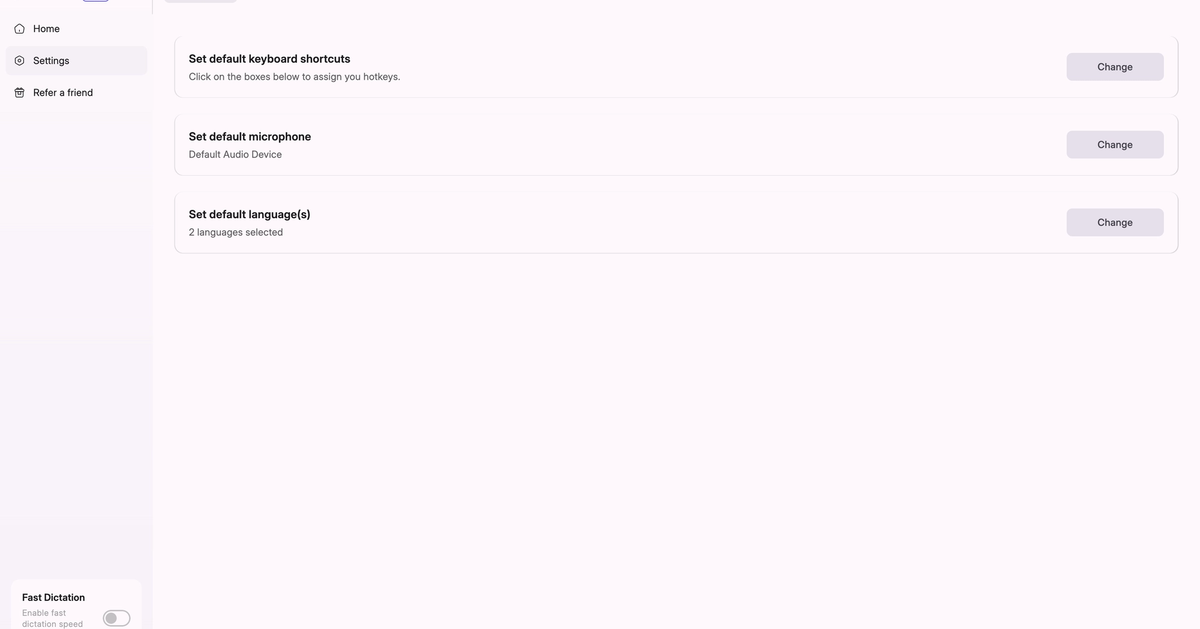
Why isn’t Oravo App recording my voice in Windows or mac?
A step-by-step troubleshooting guide to diagnose and fix audio and responsiveness issues caused by microphone permissions, input settings, or network configuration.
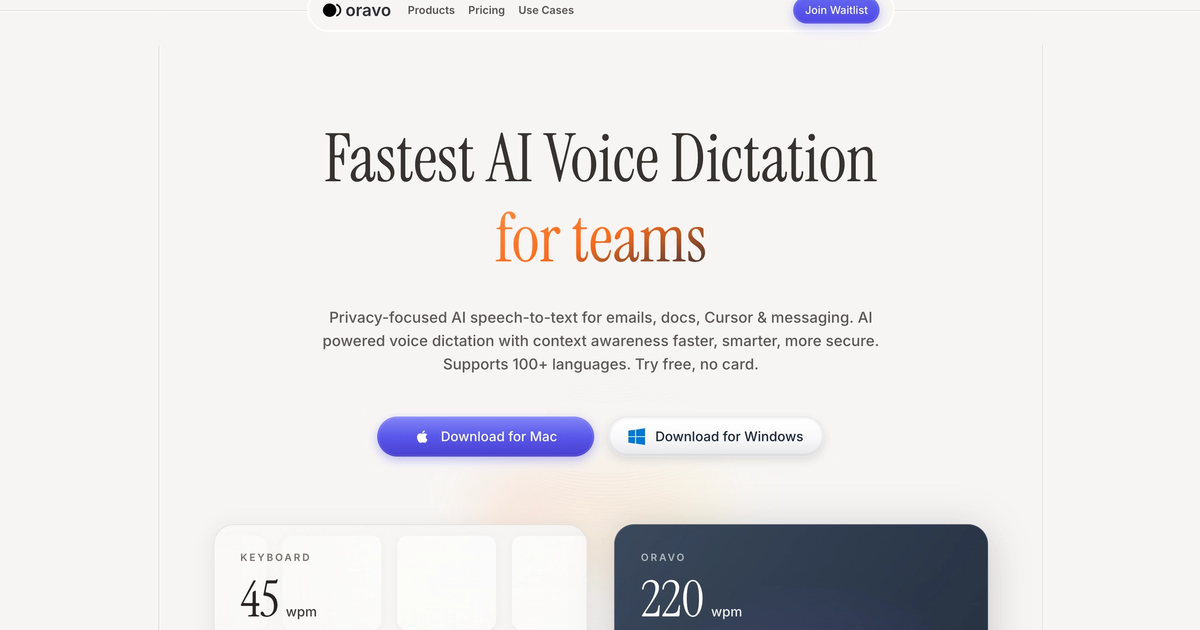
Wispr Flow vs Willow vs Oravo: Best AI Dictation 2026
Compare Wispr Flow, Willow Voice & Oravo AI. See features, pricing, accuracy tests & user reviews. Find the best voice dictation tool for your needs in 2026.
Best Voice Dictation for Developers & Coders: 4x Your Development Speed in 2026
Voice dictation for developers: prompt AI tools faster, document code hands-free, and reduce RSI. Integrates with Cursor, VS Code & all dev tools. Try free.
Voice Typing vs Keyboard: Which is Faster?
Voice typing averages 200+ WPM vs 60-90 for keyboards. Discover speed, accuracy, and productivity data to transform how you work with Oravo AI in 2026.
AI Voice Dictation Software: Complete Guide 2026
Discover how AI voice dictation software transforms productivity. Compare top tools, learn implementation strategies, and type 4x faster with Oravo AI.
Best Spanish Speech to Text Tools (2026) – Oravo.ai vs Dragon, Notta, ElevenLabs
Discover the best Spanish speech to text tools for 2025. Compare Oravo.ai, Dragon, Notta, and ElevenLabs to find the fastest, most accurate Spanish dictation app for professionals and developers.
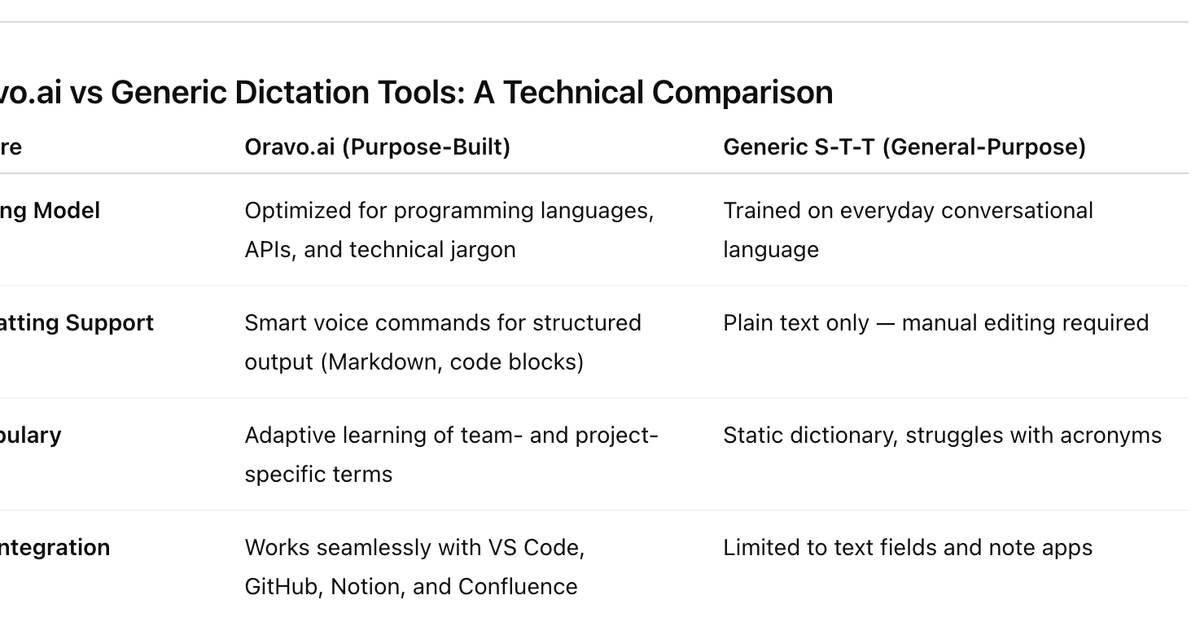
Why Generic Speech-to-Text Tools Fail at Documentation
Most generic speech-to-text (S-T-T) in the high-precision world of developer documentation, “good enough” quickly becomes a liability.
How to Use Voice Dictation for Technical Documentation in 2026
Discover how Oravo.ai helps developers write technical documentation faster using voice dictation and AI-powered tools — boosting productivity, clarity, and creativity without typing a single line.
Best Otter AI Alternatives in 2026
tter AI alternatives, best voice dictation for developers, technical documentation tools, voice-to-text for coding, AI transcription software comparison
8 Time Management Tools to Maximize Productivity
Time management is about efficiency and focus. Using the right tools and methods ensures you accomplish more in less time, reduce stress, and maintain productivity.
Best AI Voice Keyboard for 2026
Discover why Oravo.ai is the best AI voice keyboard for fast, accurate, and natural dictation in 2025. Type with your voice — faster than ever before.