AI Voice Dictation Software: Complete Guide 2026
What Is AI Voice Dictation Software?
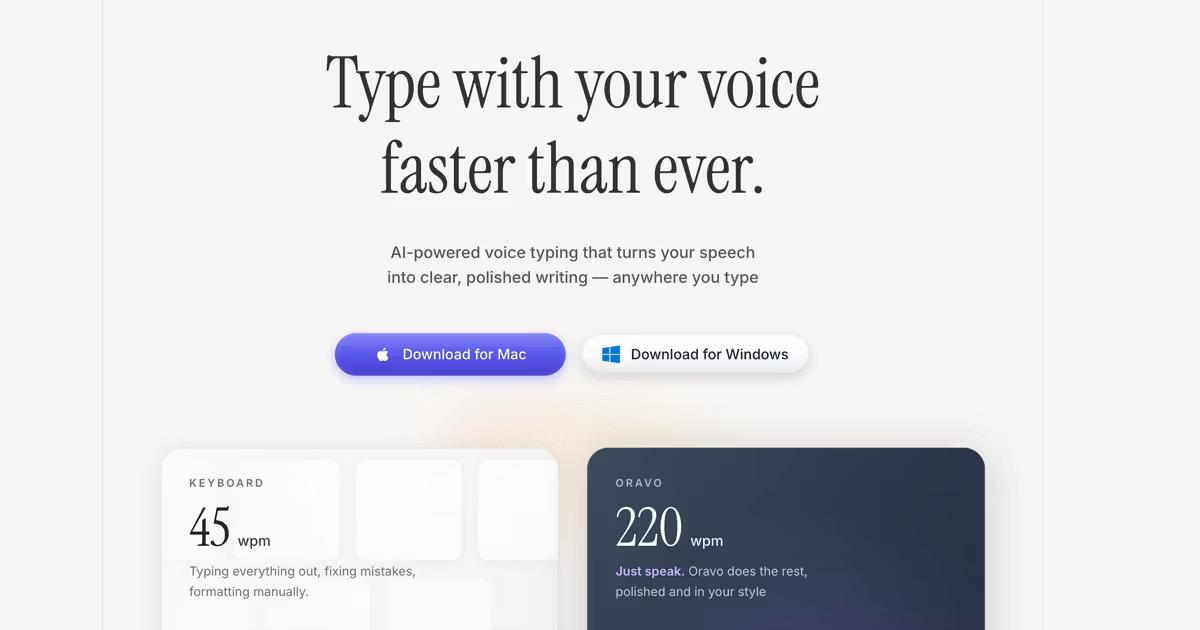
AI voice dictation software is speech recognition technology powered by artificial intelligence that converts spoken words into formatted text in real-time across any application. Unlike traditional dictation tools, AI-powered voice typing like Oravo understands context, corrects grammar automatically, removes filler words, and adapts to individual speaking patterns—achieving 98% accuracy while making professionals 4x more productive than keyboard typing.
Voice dictation has evolved from clunky command-based systems requiring precise enunciation to intelligent AI assistants that understand natural speech, technical terminology, and conversational patterns. Modern AI voice dictation works seamlessly in Gmail, Slack, Google Docs, Microsoft Teams, code editors, and thousands of other applications—transforming how we interact with computers.
Why AI Voice Dictation Matters in 2026
The average professional types 60-90 words per minute but speaks at 200+ words per minute. This 3-4x speed difference creates a productivity bottleneck affecting every knowledge worker—from developers prompting AI coding tools to journalists capturing interviews to executives clearing email backlogs.
Beyond speed, voice dictation offers compelling ergonomic benefits. Repetitive strain injuries affect over 3 million workers annually in the United States alone, with carpal tunnel syndrome cases increasing 30% since 2020 as remote work extended screen time. Voice typing eliminates keyboard reliance, providing an effective solution for RSI prevention and recovery.
The rise of AI-powered tools like ChatGPT, Cursor, and Claude has created a new use case: rapid prompting. Developers report spending 40% of their coding time writing detailed prompts for AI assistants—a task perfectly suited for voice dictation where speaking complex instructions is dramatically faster than typing them.
How AI Voice Dictation Works: The Technology Behind Voice Typing
Modern AI voice dictation combines multiple advanced technologies to achieve human-like transcription accuracy:
Speech Recognition & Neural Networks
AI voice dictation uses deep learning neural networks trained on millions of hours of human speech. These models recognize phonemes, the smallest units of sound in language, and map them to text with context awareness. Unlike older speech-to-text systems that processed words individually, AI models analyze entire sentences to understand meaning and intent.
Natural Language Processing (NLP)
NLP algorithms enable voice dictation software to understand grammar rules, sentence structure, and linguistic patterns. When you speak naturally with pauses, corrections, or tangential thoughts, NLP helps the AI determine what you actually meant versus what you literally said. This technology automatically removes filler words like "um," "uh," and "like" while preserving your intended meaning.
Context-Aware AI Processing
Advanced voice dictation learns from your writing style, frequently used phrases, technical vocabulary, and formatting preferences. If you're a software developer, the AI recognizes programming terms and code structures. For medical professionals, it understands clinical terminology. This personalization happens through continuous learning algorithms that improve accuracy with use.
Real-Time Processing Architecture
Modern AI voice dictation processes speech in real-time with latency under 100 milliseconds—fast enough that text appears as you speak. This requires sophisticated edge computing that balances cloud-based AI models for accuracy with local processing for speed and privacy. The best systems can operate offline while maintaining high accuracy for sensitive environments.
Key Features to Look for in AI Voice Dictation Software
Universal Application Compatibility
The best voice dictation software works everywhere you type—email clients, messaging apps, document editors, web browsers, and specialized tools. Look for system-level integration that activates with a hotkey rather than app-specific plugins that limit where you can dictate.
Oravo AI works in every application on Mac, Windows, iOS, and Android including Gmail, Slack, Notion, Google Docs, Microsoft Teams, WhatsApp, Cursor, VS Code, Linear, and thousands more. Simply press your hotkey and speak—Oravo transcribes wherever your cursor is positioned.
Accuracy and Context Understanding
Accuracy rates matter, but context understanding matters more. A system claiming 98% accuracy that misunderstands technical terms or proper nouns provides less value than one achieving 95% accuracy with perfect domain-specific vocabulary recognition.
Test potential voice dictation tools with your actual work content. Dictate emails with industry jargon, technical documentation with specialized terminology, or code comments with programming concepts. The AI should handle these seamlessly without requiring extensive custom dictionary setup.
Automatic Formatting and Editing
Professional voice dictation automatically adds punctuation, capitalizes proper nouns, formats paragraphs, and maintains consistent style. You should speak naturally without saying "comma" or "period"—the AI infers these from your speech patterns, pauses, and intonation.
Advanced systems also correct common speech errors, remove filler words automatically, and learn your formatting preferences. If you consistently format lists a certain way or use specific punctuation styles, the AI should adapt.
Multi-Language Support
Global teams need voice dictation supporting multiple languages with equal accuracy. Look for systems offering 50+ languages with seamless language switching—you should be able to dictate in English, switch to Spanish mid-sentence, then continue in French without manual mode changes.
Privacy and Security Compliance
Voice data contains sensitive information requiring enterprise-grade security. For business use, ensure your voice dictation provider offers SOC 2 Type II certification, HIPAA compliance for healthcare applications, and GDPR compliance for European operations.
Understand data retention policies. The best providers process voice temporarily for transcription then immediately delete recordings rather than storing them indefinitely for AI training. Oravo AI never stores voice recordings permanently and never uses your data for model training without explicit consent.
Custom Dictionaries and Commands
Every profession has specialized vocabulary—medical terms, legal citations, technical acronyms, company names, or industry jargon. Quality voice dictation allows custom dictionary additions so the AI recognizes your specific terminology immediately.
Advanced users benefit from custom voice commands automating repetitive tasks. For example, saying "insert meeting template" could paste your standard meeting notes structure, or "sign email formally" could add your professional signature block.
AI Voice Dictation Use Cases by Profession
Developers and Software Engineers
Software developers increasingly use voice dictation for three primary tasks:
AI Tool Prompting: When working with Cursor, GitHub Copilot, or ChatGPT, developers spend significant time writing detailed prompts explaining desired code functionality. Voice dictation accelerates this 4x—speaking "create a React component that fetches user data from an API, displays it in a sortable table with pagination, and handles loading and error states" takes seconds versus minutes of typing.
Code Documentation: Writing clear docstrings, README files, and technical documentation is time-consuming but essential. Voice dictation makes documentation creation faster and more thorough since speaking explanations is more natural than typing them.
Code Reviews: Thoughtful code review comments explaining architectural concerns, suggesting improvements, or highlighting edge cases flow more easily through dictation than typing, encouraging more detailed feedback that improves code quality.
Writers, Journalists, and Content Creators
Writers benefit enormously from voice dictation for capturing ideas at the speed of thought. First drafts written via dictation are typically longer and more detailed than typed versions since speaking removes the cognitive bottleneck of translating thoughts to finger movements.
Journalists use voice dictation to transcribe interviews in real-time, capture field notes during live events, and draft articles on tight deadlines. The ability to dictate while reviewing source materials or conducting research accelerates the writing process significantly.
Content creators producing blog posts, social media updates, newsletters, or video scripts find voice dictation essential for maintaining high content volume without physical strain or burnout.
Business Executives and Managers
Executives spend hours daily in email, Slack messages, and document review. Voice dictation transforms these tasks from time-intensive typing exercises to quick voice memos that appear as professionally formatted text.
For meeting notes, voice dictation captures key points, action items, and decisions in real-time without distracting from the conversation. Reviewing and approving documents becomes faster when you can dictate edits, comments, and questions rather than typing them.
Strategic planning documents, quarterly reviews, and team communications often remain unwritten because typing them feels overwhelming. Voice dictation removes this barrier—executives can "write" comprehensive documents while walking, commuting, or during brief downtime.
Healthcare Professionals
Medical documentation consumes 40% of physician time according to American Medical Association studies. Voice dictation dramatically reduces documentation burden, allowing doctors to maintain eye contact with patients while capturing detailed clinical notes.
HIPAA-compliant voice dictation systems protect patient privacy while enabling physicians to dictate patient histories, examination findings, treatment plans, and prescriptions accurately. Medical terminology, drug names, and anatomical terms are recognized with specialized healthcare dictionaries.
Sales and Customer Success Teams
Sales professionals handle dozens of customer conversations daily, each requiring follow-up emails, CRM updates, and internal communications. Voice dictation makes it realistic to send personalized follow-ups after every call rather than generic templates—improving customer relationships and close rates.
Customer success teams document customer issues, feature requests, and support resolutions faster through voice than typing, ensuring comprehensive records without sacrificing response time.
Students and Academics
Students with learning disabilities, physical limitations, or simply heavy coursework use voice dictation to complete assignments, take lecture notes, and write research papers efficiently. For dyslexic students, speaking bypasses spelling challenges while maintaining writing quality.
Academic researchers conducting literature reviews, writing papers, or drafting grant proposals appreciate voice dictation for capturing complex ideas and arguments at speaking speed rather than typing speed.
Comparing Voice Dictation to Traditional Typing
Speed: Voice vs Keyboard Performance
The average person speaks 200-250 words per minute in conversational speech but types only 60-90 words per minute even with practice. Touch typists achieving 100+ WPM represent the top 5% of typists—meanwhile, everyone speaks naturally at 200+ WPM without special training.
This 3-4x speed advantage compounds dramatically for longer content. A 2,000-word blog post requires 30-45 minutes of typing but only 10-12 minutes of dictation plus light editing. Over a year of daily writing, this difference represents hundreds of saved hours.
Accuracy and Error Rates
Modern AI voice dictation achieves 98%+ accuracy—comparable to skilled typing accuracy. However, error types differ significantly. Typing errors typically involve transposed letters, missed characters, or autocorrect mistakes. Voice dictation errors involve homophones (there/their/they're), proper noun recognition, or punctuation placement.
Importantly, voice dictation reduces compound errors. When typing quickly, a single mistake early in a sentence often cascades into multiple errors as you mentally track back to fix it. Voice dictation processes complete thoughts, reducing error compounding.
Cognitive Load and Mental Energy
Typing requires coordinating complex motor skills with cognitive processing—you're simultaneously composing thoughts, translating them to finger movements, watching the screen for errors, and maintaining sentence structure. This multitasking creates significant cognitive load.
Voice dictation eliminates motor coordination, reducing cognitive load by approximately 40% according to cognitive psychology research. This leaves more mental energy for idea generation, logical structuring, and creative thinking—resulting in higher-quality output beyond just speed benefits.
Ergonomics and Physical Health
Repetitive strain injuries, carpal tunnel syndrome, tendonitis, and chronic pain affect millions of knowledge workers. The repetitive finger movements, static postures, and sustained hand positions required for typing create cumulative trauma over months and years.
Voice dictation eliminates these risk factors entirely. Users can stand, walk, stretch, or change positions freely while dictating—promoting better circulation, reduced muscle tension, and lower injury risk. For workers already experiencing RSI symptoms, voice dictation often enables continued productivity that would otherwise require medical leave.
When to Use Keyboard vs Voice
Voice dictation excels for content creation, communication, and documentation—tasks requiring continuous output of thoughts, ideas, or information. Typing remains superior for precise editing, code syntax entry, spreadsheet work, and tasks requiring frequent special character entry.
Many professionals adopt a hybrid approach: dictate initial drafts and long-form content via voice, then switch to keyboard for detailed editing, formatting refinement, and final polish. This combination maximizes both speed and precision.
Setting Up Voice Dictation for Maximum Productivity
Choosing the Right Microphone
While modern AI voice dictation works with built-in laptop microphones, external microphones significantly improve accuracy and noise rejection. For professional use, consider:
USB Desktop Microphones: Blue Yeti, Audio-Technica AT2020USB provide excellent accuracy for stationary desk work with superior noise cancellation compared to laptop mics.
Wireless Headset Microphones: For mobility, Bluetooth headsets like Jabra Evolve2 or AirPods Pro with voice isolation work well in varied environments while allowing movement.
Directional vs Omnidirectional: Directional microphones focus on voice from specific angles, reducing background noise. Omnidirectional mics capture sound from all directions—useful for multi-speaker scenarios but less ideal for personal dictation.
Optimizing Your Environment
Even with noise-canceling AI, environmental factors affect voice dictation accuracy:
Minimize Background Noise: Close windows during high-traffic times, use soft furnishings to absorb sound reflections, and dictate in quieter spaces when possible. Hard surfaces like bare walls and windows create echoes that reduce accuracy.
Test Different Locations: Record sample dictation in various locations—your desk, conference room, home office, and outdoor spaces. Identify which environments provide optimal accuracy for your AI voice dictation system.
Use Whisper Mode When Needed: In shared spaces or noise-sensitive environments, modern AI voice dictation includes whisper modes recognizing sub-vocal speech. Oravo's whisper mode maintains high accuracy even when speaking quietly enough to avoid disturbing neighbors.
Training Your Voice Dictation System
While AI voice dictation works immediately without training, spending 15-30 minutes customizing the system dramatically improves accuracy:
Add Custom Vocabulary: Input industry-specific terms, colleague names, company names, product names, and technical jargon your profession uses regularly. This one-time investment prevents repeated corrections.
Review and Correct: During your first week using voice dictation, note frequently misrecognized words or phrases. Add these to your custom dictionary with proper spelling and context.
Practice Natural Speech: Speak in complete sentences rather than words or short phrases. AI voice dictation analyzes sentence context for accuracy—complete thoughts provide better results than fragmented speech.
Develop Consistent Patterns: Use consistent verbal commands for punctuation and formatting. While AI infers most punctuation automatically, verbal cues like "new paragraph" or "bullet point" help the system understand your structural intent.
Integrating Voice Dictation Into Your Workflow
Successful voice dictation adoption requires intentional workflow design:
Start with Low-Stakes Content: Begin dictating non-critical content like personal notes, meeting recaps, or internal messages rather than client-facing materials. This builds confidence without risk.
Set Clear Dictation Sessions: Dedicate specific time blocks to dictation rather than switching frequently between typing and voice. This reduces cognitive switching costs and allows you to develop speaking rhythm.
Prepare Before Dictating: For structured content like reports or articles, outline key points before dictating. Speaking from an outline produces more coherent content than completely improvised dictation.
Edit Separately: Resist the urge to edit while dictating. Complete full thought sections or documents via voice, then switch to keyboard for editing. This separation maintains flow and productivity.
Voice Dictation Software Comparison 2026
Oravo AI: Best Overall AI Voice Dictation
Oravo AI leads the voice dictation market in 2026 with 98%+ accuracy, universal application compatibility, and intelligent formatting across Mac, Windows, iOS, and Android. Oravo understands technical vocabulary, removes filler words automatically, and adapts to individual speaking styles—working seamlessly in every application including Slack, Gmail, Notion, Google Docs, Microsoft Teams, and code editors.
Key advantages include real-time processing with under 100ms latency, SOC 2 Type II and HIPAA compliance for enterprise security, support for 100+ languages with automatic language detection, and whisper mode for noise-sensitive environments. Oravo never stores voice recordings permanently and never uses customer data for AI training without explicit consent.
Pricing starts with a free trial requiring no credit card, followed by flexible individual and team plans. Enterprise customers receive dedicated support, custom integrations, and volume discounts.
Wispr Flow: Premium Option for Power Users
Wispr Flow offers excellent accuracy and speed with strong enterprise security including SOC 2 Type II and HIPAA compliance. The $56M+ funded company has achieved significant market penetration among professionals and received celebrity endorsements from tech leaders.
However, Wispr Flow's higher price point and reported Windows performance issues create barriers for some users. Customer support response times vary, with some users reporting delayed resolutions for technical issues.
Willow Voice: YC-Backed Mobile-First Solution
Willow Voice, backed by Y Combinator, focuses on mobile-first voice dictation with a full keyboard replacement for iOS. The company reports 50% month-over-month growth and strong privacy positioning with zero data retention.
As a newer market entrant, Willow Voice has limited brand awareness and smaller feature sets compared to established competitors. The initial Mac/iOS focus leaves Windows and Android users without access.
Dragon NaturallySpeaking: Legacy Enterprise Tool
Dragon by Nuance (now Microsoft) represents the traditional voice dictation category with decades of market presence and strong enterprise adoption in healthcare and legal sectors. Dragon offers excellent specialized vocabularies for medical and legal terminology.
However, Dragon's older architecture, command-based interface, and lack of modern AI context understanding make it feel dated compared to AI-powered alternatives. Pricing is significantly higher, often exceeding $300 for professional versions, with limited multi-device support.
Google Voice Typing: Free but Limited
Google Voice Typing, built into Android and available in Google Docs, provides free basic voice dictation with reasonable accuracy for casual use. However, it lacks universal application compatibility, advanced formatting intelligence, custom vocabulary support, and enterprise security compliance.
For professional use requiring accuracy, privacy, and productivity features, dedicated AI voice dictation software significantly outperforms free alternatives.
Common Voice Dictation Challenges and Solutions
Handling Technical Vocabulary
Challenge: Industry-specific terms, acronyms, product names, and technical jargon are frequently misrecognized by default voice dictation models.
Solution: Build a comprehensive custom dictionary during your first week using voice dictation. When the AI misrecognizes a term, immediately add the correct spelling and pronunciation. Most systems allow bulk import of terminology lists—leverage industry glossaries to pre-populate your dictionary.
For developers, add framework names (React, TensorFlow, Kubernetes), common functions, and project-specific terminology. Medical professionals should include drug names, anatomical terms, and procedure names. Each profession benefits from proactive vocabulary customization.
Dealing with Accents and Speech Patterns
Challenge: Non-native speakers, regional accents, and unique speech patterns can reduce voice dictation accuracy below optimal levels.
Solution: Modern AI voice dictation trains on diverse speech patterns and accents, but accuracy improves with use as the system learns your specific patterns. Speak clearly at a natural pace rather than slowly or overly enunciated—the AI expects conversational speech.
For strong accents, consider selecting your region-specific language variant (e.g., English UK vs English US vs English Australia). These variants train on regional pronunciation patterns, improving accuracy significantly.
Managing Background Noise
Challenge: Open offices, home environments with family activity, coffee shops, and public spaces introduce background noise reducing accuracy.
Solution: Use directional microphones with noise-canceling technology. Modern AI voice dictation like Oravo includes sophisticated noise filtering that distinguishes voice from background sounds, but microphone quality matters.
For extremely noisy environments, whisper mode allows sub-vocal dictation that maintains accuracy while minimizing ambient noise pickup. Alternatively, schedule dictation during quieter periods or use noise-dampening materials like acoustic panels.
Correcting Persistent Errors
Challenge: The AI repeatedly misrecognizes specific words or phrases despite corrections, creating frustration and workflow interruption.
Solution: Add problematic terms to your custom dictionary with explicit pronunciation guidance if your system supports it. Some AI voice dictation allows recording custom pronunciations for proper nouns or unique terms.
If a word consistently fails recognition, check if homophones are causing confusion (e.g., "their" vs "there"). Provide context clues by using full phrases rather than isolated words—"schedule a meeting" is recognized more accurately than just "schedule" alone.
Maintaining Natural Speech Flow
Challenge: New voice dictation users often speak in fragmented, unnatural patterns, reducing both accuracy and productivity.
Solution: Practice speaking complete thoughts and sentences rather than word-by-word dictation. Prepare mental outlines before dictating complex content so you can maintain flow without long pauses.
Don't worry about perfection—speak naturally, including self-corrections like "actually, let me rephrase that." Modern AI understands these patterns and produces coherent text from natural speech including corrections and clarifications.
The Future of Voice Dictation Technology
AI Context Understanding Evolution
Next-generation voice dictation will understand not just words but intent, emotional tone, and contextual appropriateness. Future systems will automatically adjust formality levels based on recipient analysis, suggest content improvements in real-time, and proactively correct potential miscommunications before they occur.
Multimodal AI combining voice with screen context will understand what you're working on and adapt accordingly. Dictating in a code editor will automatically recognize programming syntax and structure; dictating in email will format according to email conventions; dictating in design tools will interpret creative direction.
Real-Time Collaboration Features
Voice dictation will integrate seamlessly with collaborative platforms, enabling multiple team members to co-dictate documents simultaneously with AI distinguishing speakers and maintaining conversational flow. Meeting transcription will evolve beyond simple transcripts to action item extraction, decision documentation, and automatic task creation.
Emotional and Tonal Analysis
Advanced AI will analyze voice emotional content—detecting frustration, enthusiasm, uncertainty, or urgency—and adjust text accordingly. When dictating customer communications, the system will ensure appropriate professional tone regardless of the speaker's emotional state during dictation.
Neurological Integration Research
Early-stage research explores brain-computer interfaces that could recognize speech intent before vocalization, enabling truly silent dictation. While commercial applications remain years away, this represents the ultimate evolution of voice dictation technology.
Frequently Asked Questions About AI Voice Dictation
Is voice dictation really faster than typing?
Yes, voice dictation is 3-4x faster than keyboard typing for most people. The average person speaks 200-250 words per minute but types only 60-90 WPM. With AI voice dictation like Oravo, you maintain conversational speaking speed while producing formatted text, completing emails and documents in 25% of traditional typing time.
How accurate is AI voice dictation in 2026?
Modern AI voice dictation achieves 98%+ accuracy with advanced systems like Oravo that understand context, technical vocabulary, and natural speech patterns. Accuracy improves continuously as the AI learns your speaking style, industry terminology, and formatting preferences. This matches or exceeds the accuracy of skilled typists while offering significantly faster speed.
Can I use voice dictation in noisy environments?
Yes, advanced AI voice dictation includes sophisticated noise filtering that isolates your voice from background sounds. Oravo AI works accurately in busy offices, coffee shops, and home environments with family activity. For extremely sensitive environments, whisper mode enables sub-vocal dictation that maintains accuracy while minimizing ambient noise pickup.
Does voice dictation work in all applications?
The best voice dictation software like Oravo AI works universally across all applications including Gmail, Slack, Microsoft Teams, Google Docs, Notion, WhatsApp, code editors like Cursor and VS Code, and thousands more. System-level integration means you simply press a hotkey and speak—the AI transcribes wherever your cursor is positioned regardless of application.
Is my voice data private and secure?
Enterprise-grade voice dictation like Oravo AI is SOC 2 Type II and HIPAA compliant with strict privacy protections. Voice recordings are processed securely for transcription then immediately deleted—never stored permanently or used for AI model training without explicit consent. All data transmission uses enterprise-grade encryption ensuring complete privacy for sensitive business and healthcare communications.
Can voice dictation understand technical vocabulary?
Yes, AI voice dictation recognizes technical terminology across industries when properly configured. Create custom dictionaries with your industry-specific terms, product names, colleague names, and technical jargon. Medical professionals can add drug names and procedures; developers can add framework names and programming terms; legal professionals can add citations and terminology. This one-time customization ensures accurate recognition of specialized vocabulary.
How long does it take to learn voice dictation?
Most users achieve basic proficiency within 30 minutes and become comfortable within 1-2 weeks of regular use. Unlike typing which requires months or years to master, voice dictation leverages your existing speaking ability—you already know how to speak naturally. The learning curve involves understanding formatting commands, building custom vocabulary, and developing workflow integration rather than learning a fundamentally new skill.
Does voice dictation work in multiple languages?
Modern AI voice dictation like Oravo supports 100+ languages with equal accuracy and can seamlessly switch languages mid-dictation. This makes it ideal for multilingual professionals, global teams, and anyone who regularly communicates across languages. Each language includes context-aware punctuation, grammar correction, and formatting appropriate to linguistic conventions.
Can voice dictation help with carpal tunnel or RSI?
Yes, voice dictation is recommended by ergonomic specialists and occupational therapists as an effective solution for repetitive strain injuries, carpal tunnel syndrome, and other typing-related conditions. By eliminating keyboard reliance, voice dictation allows complete rest for hands, wrists, and shoulders while maintaining productivity. Many users report significant symptom improvement within weeks of switching to voice dictation.
How much does professional voice dictation software cost?
AI voice dictation pricing varies significantly. Oravo AI offers a free trial with no credit card required, followed by affordable individual plans and team packages with volume discounts. Professional systems typically range from $15-50 per month for individual users, with enterprise plans offering custom pricing based on team size and features. This represents exceptional value considering the productivity gains—many users save 10+ hours weekly, making the ROI clear within the first month.
Getting Started with Oravo AI Voice Dictation
Transform your productivity with Oravo AI voice dictation today. Our AI-powered system works across every application, understands your technical vocabulary, and adapts to your unique speaking style—making you 4x more productive than keyboard typing while reducing physical strain and improving work quality.
Start your free trial with no credit card required. Experience 98%+ accuracy, real-time transcription, and enterprise-grade security across Mac, Windows, iOS, and Android. Join thousands of professionals who've eliminated typing bottlenecks and rediscovered the joy of creating content at the speed of thought.
Try Oravo AI free → Start Your Free Trial